Categories
presentations

Libraries mentioned at Digital Web

I link to the occasional article from Digital Web, when they post something web-design related that I want to point my loyal readers toward. Today, however, I’m linking to Digital Web not because of a web design article, but because of a library-related article. The library angle?

I’ll discuss ways to navigate some of the clutter of older card catalogs (now ‘updated’ to the web); services like interlibrary loan that get you stuff from almost anywhere; some of the specialized database-driven applications you can’t affordably access from the outside world; and a host of other tools and issues you have probably never considered. In the end, you will come out a more agile designer and developer.

It’s basically about how to use your local library’s resources to save some cash and get some great material that just isn’t available anywhere else. It’s geared mostly to academic libraries (the author is a librarian at a university, so that makes sense) and it’s brutally honest about the challenges of navigating most library websites, but it is a great outreach effort to other disciplines to get more people into our libraries.
This is sort of what I’m trying to do by presenting at the NAGW conference this year, as a matter of fact. I deliberately chose a non-library conference to present my Web 3.0 stuff at because I wanted to share what libraries have to offer with non-librarians. No point in preaching to the choir, there… I’ll probably do a revised version of this presentation at library conferences, too, but the tone/direction will be different. It will be more of a “how to make your stuff EASY to use”, not “how to use what your local library has to offer” sort of thing.

Categories
presentations Web 2.0

Becoming 2.0

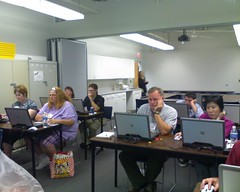
Bobbi and I finished up our 4-day workshop on all things Web 2.0 on Friday. I was surprised at how tired I got after each day of teaching, but it was also strangely invigorating, too. The students in the class were really engaged and willing to learn, although there was a lot of complaints about too-full-heads, I think they got some good information out of it and I’m really looking forward to seeing what they do when they get back to their home libraries and get some time to put this stuff into practice!

Becoming 2.0 class hard at work

Categories
presentations

What do you want?

I’m doing a bit of “audience testing” – if you all could request specific information in a book about collaboration 2.0 – anything at all – what would you like to see? I’m not promising I’ll include everything (it’s more of a booklet than a book so space is limited…), but I’d love to hear what you all are interested in and what would make you think this is a non-pass-upable bit of reading!

Categories
presentations

Rut bustin’ at the library

You all might know that I’m the Information Technology Manager for the Missouri River Regional Library. This means that I work behind the scenes a lot, making sure that computers are working, networked bits are flowing and that everyone has the technology they need to do their jobs. I also spend some time working on the PCC desk, our public computer service point, but that’s about the only interaction I get with patrons. Until today. We are pretty seriously short staffed, so when an email went out asking for help in the circulation department, I volunteered for a 2 hour shift. I have to say that I’m really glad I did.
I’ve worked circulation before – for a few minutes at a time and about 4 times over the past 10 years – so it’s been rare and short. Getting 2 solid hours to see the kinds of questions they get, the sort of needs they have and to actually talk to patrons who are using the technology I provide is pretty cool. I’m also doing a bit of dual-training. The Circ manager is working with me and is being incredibly patient as she’s training me, but she’s also picking my brain about various tricks she would like to use with our new Gmail interface to mail, so I’m training her on the use of our new email system, too! This is something I may try to do far more often – it’s been a great way to get me out of my all-computers-all-the-time rut (though I’ve been working on my Web 2.0 presentation in between patrons…) and into the main life of the library!

Categories
presentations

Objections to social media in the workplace

Engaged Learning has a series – just wrapping up this week – on 15 common objections to social sites and media in the workplace. There are LOTS of things that I’ve heard from folks and some great ways to combat those ideas. He’s encouraged comments on each of the objections, too, so you can scan through and get an idea of how other people would approach the same problem. Read through these and be armed next time someone tells you that blogs have nothing to do with training or that allowing access to Facebook will cause all employees to spend all their time socializing instead of working!
These are geared toward corporate environments – but some of the ideas may work well for schools, which do a lot of banning of social sites. Either way, it’s worth a read and being better prepared to handle objections is never a bad thing!

Categories
Web 2.0 Writing

A new project for me!

Now that everything is officially official, I can let my loyal readers know what my next big project will be (besides 4 presentations in 3 months and a changeover from Exchange to Google hosted email)! While I was in Anaheim for ALA, I was approached at my table at the Social Software Showcase by an editor for the ALA Tech Source Tech Reports and asked if I’d like to write one for them. After some discussion of topic and timing, I can now say that the May/June 2009 issue of the Tech Report will be on Collaboration 2.0 (working title – it’ll probably change…) and will deal with using Web 2.0 tools (Facebook, Ning, Twitter, Flickr, etc.) to provide a platform for collaboration in libraries. I’m pretty excited about the project and am champing at the bit to get started! I’ll be doing some serious tapping into my social network to get examples of collaboration from my librarian buddies on Twitter, Facebook, Ning (starting to sound familiar?) and the like. Don’t feel like you have to wait to be asked, though, if you are doing some collaborative project and using these tools – feel free to drop me a line and let me know what you are doing any time!

Categories
AWeekInTheLife

TGIF

Ok, play by play for my Friday:

8:00am – get to work, count money in the PCC, get computers started, meet Mike and head to our Linn branch library to do some work out there.
9:15am – get into the Linn branch and find the DVD color settings. Doesn’t make much difference, the sky is still green and the houses and people are alarmingly red. We can get it to sort of work, though, so it will do until I can get to Best Buy and pick up a $30 DVD player to replace the one that won’t display colors correctly any more. I also install the VPN client into her new computer so that she can check email and such – 3 weeks before I change the email. I’m timely…
11:15am – get back to the library and grab a quick lunch
12:00pm – start my regular Friday shift on the PCC desk. I spent the first hour clearing my email inbox and perusing the online “weekly sales” flyers that we don’t get at home, since we read the paper all online these days. 2 of the big grocery stores in town offer the flyers at home, so we don’t really need to get the newspaper to get the specials and the coupons. Yeah! I enter the stuff I want to get into RTM, separated out by location of the store, then print off my shopping lists by store as well. I now have a somewhat organized shopping list and some idea of what I’ll be cooking next week. I feel organized.
Shortly after my first hour on the desk, we have a problem patron issue and I have to ask the young woman to leave. After that there is some discussion about the issue on FriendFeed and I’ll have to admit to egging on Stephen Cohen’s rants about video games in the course of the discussion. That takes up most of my second hour on the desk.
I spent the last hour of the shift reading through my blogs and FriendFeed stream while also answering computer questions, selling printouts and creating temporary cards for visitors to our area.
3:00pm – Break time!
3:15 – I get to sit down in my office chair for the first time today and spend some time checking email, reading through the rest of my blog posts and getting the first batch of GApps accounts set up in Google’s systems. I also got a call from our Linn branch manager about PCC policies for porn viewing and for hacking our systems to get extra time from our PC Reservation software.
4:30 – Find and download sysprep for Mike as he finishes getting the OPACs ready for ghosting – again – and demonstrate how to use it.
4:45 – go home.
That’s it – that is my week at work. Hope somebody found it helpful, or at least as amusing as Nikki did. She thought my Wednesday post was “LOLworthy” (as she informed me via txt on Thursday). I’m glad someone enjoyed my pain…

Categories
AWeekInTheLife

Thursday – the week is almost over!

A quick note about last night – I did manage to get one whole load of laundry done while balancing vegging and calling in to UV – so I feel somewhat productive… I also had to spend some time last night re-assigning all the things on my RTM list that were supposed to get done yesterday to later in the week or early next week. That’s one of the reasons for the update to the post yesterday – since I did almost nothing on my to-do list, I couldn’t go back last night and review it for reminders of what I’d done all day.
I’m doing better today – so far I’ve come in, checked my email, opened Twhirl and reviewed last nights FF conversations and ticked one item off my to-do list for today: adding our Employee of the Month’s name to the Intranet. Yeah! It’s only 8:20 and I’m already feeling like stuff’s going to get done today!!
During the next hour, I cleaned up the database pages and confirmed that we don’t seem to subscribe to Facts On File legal forms database, so I can’t add a link to it as requested on one of my “to-dos” for the day, but I can clean the pages up because they were looking a bit ragged. I spend some time in email scheduling my guest post for TTW and getting more information from folks about other items on my to-do list, including trying to find a way to pay for Google Apps for Domains without a credit card that will cover the entire amount… Still waiting to hear from them on that one! The hour after that, I spent some time telling my staff what to do (that’s always fun!!) and getting Nikki out to recrimp some wires in the library Annex building. I spent some small amount of time on Facebook (for the first time this week, I’m so slipping), ignoring application invites, sending birthday cards and confirming blog ownership for several others on the Blog Network application. I also spent some time socially networking with staff members in face-to-face ways – over a cigarette or two – in an “outside meeting”. Nothing like keeping up with what’s going on then by sharing a smoke break!
After all my social networking was done, I got called over to the Annex building to try to troubleshoot the wire crimping Nikki was doing. I think we got it about half-fixed when we lost patience with it and decided to break for lunch. Lunch involved errands, today. Lots of running around…

After lunch, I tackled more ghosting issues – Mike (my coworker and SO) took over the ghosting after I got so frustrated he was afraid I’d start lobbing computers at him. He fixed the network card issue and got them all ghosted up – but forgot to run sysprep first so they would not all have the same id. We spent the afternoon setting them up, realizing that we couldn’t change the name on all but the first one, figuring out why (no sysprep – of course) and then starting the process of fixing it.
At 4pm I finally weaseled my way out of that and came downstairs to do a final check of my email, answer some questions for Nikki about what printers got installed on the new computer she’s building for a staff member and create a flyer for my Mom’s neighborhood watch party in August. Now that that is all done (mostly, I’m at inbox 9, not inbox 0 – but I’m beyond caring at this point), I’m heading home to corral Mike and Alex and get them to Columbia for a BBQ at my high school BFF’s dad’s house. She has a new little girl I haven’t met yet and she hasn’t seen my little boy since before he got taller than me! My RTM task list is empty (because I know where the “postpone” button is) and my day is pretty much complete. I’m outta here!
Tomorrow I have a trip to Linn (our branch library) scheduled and 3 hours on the PCC desk, so I’m hoping that the entry for Friday is fairly short. Really, really, really hoping…

Categories
AWeekInTheLife

Busy Wednesday!

Today wiped me out. I almost don’t have the energy to write about it, but I’ll make one last push for productivity before sitting down and vegging all evening (between loads of laundry, of course…).
This morning I was going to get to work early to get the PCC ready before our All Staff meeting, but I ran into a former high school teacher (and chaperon on my high school trip to Italy) at the local coffee shop I frequent and had to sit and chat with him for a bit. Once I got to work (about 7:50am), I counted money, got change for our register and started up about half of the PCC computers before it was time to go to the meeting. At 8:15 on the Wednesday morning after the 3rd Tuesday of the month (stop laughing, I couldn’t make that kind of schedule up if I tried!), our director gets all the staff who happen to be in the building together to tell us about the board meeting the night before, pick a name from the pile for the Employee of the Month program (everyone who was given a “You’ve Been Caught” going above and beyond the duties of your job during the course of the month is in that pile – the winner gets a gift certificate and a prime parking space – and a spot on our Intranet announcing their win – I forgot to add our winner to the that spot today, but I’ve already added it to RTM to remember for tomorrow!) and generally keep the staff up on the news of the library. During the meeting, my participation in Uncontrolled Vocabulary (UV) was mentioned, so I’m curious to see if any of my co-workers decide to join us tonight on the call! After the meeting I talked to Bobbi (about scheduling a time to talk about our upcoming Summer Institute 4-day workshop on Web 2.0 stuff) and our Linn Library Branch Manager about the issues she’s been having with her projector’s color (I think it’s the DVD that’s causing problems – we’ll see for sure tomorrow) and with our Collection Development librarian about getting information on the web about our “Capital Read” program and the author of our chosen book. Finally, after all that, I made it back downstairs to turn on my computer and start the day. I got about halfway through my email when the Children’s department called – they had a non-responsive keyboard on one of their desk computers. I grabbed a replacement and went upstairs to change it out, but didn’t have to. It was a bad USB port – move the keyboard to a new port, fix the problem! Back down to the basement to finish my email (which I ALMOST did) and there is another call – the people using the Art Gallery for a program had video, but no audio, from the VCR. I went upstairs, cleaned the air filter (there was a popup on the screen saying it needed to be done, so I did it while I was there) and turned the stereo receiver to the correct setting to get audio from the VCR. Back downstairs to finally sit down and check my blogs…
Except that the director, who was going to give me a tutorial in the use of Norton’s Ghost application to speed up deployment of computers, showed up. 3 hours later, after installing, setting everything up, and burning through about 15 floppy disks to find 2 good ones to use for the boot disks, we discovered that the network card on one of the machines refused to play along with us. By this time it was 3pm, I hadn’t had lunch yet and I was so irritated at the floppy disk situation that I dropped the whole project (with a note to the director telling him where I was in the process) for the day. After all that, I finally checked my “daily” blog folder to see what was going on in the world and went through the email that had accumulated while I was valiantly fighting floppies.
[sidebar] I’ll note that not once in this very long narrative has there been a single mention of Twitter, Facebook or Twhirl. I was completely disconnected from my social network today and it was no fun. [/sidebar]
After I closed down and packed up my office and talked to the afternoon PCC clerk and asked him to relay information to the evening PCC clerk, I headed over to our Administrative building and tried out 4 different desk chairs before deciding on the one that I want at my desk. When that was done (at about 4:30 – deciding on a chair is a lengthy process with lots of discussion required), I got into my car and headed home.
Now that I’m done with my day at work, I’m going to start on laundry and really work on getting some quality vegging time in before I call into UV tonight. Hope to see you all there!

update And I completely forgot to mention the work I did today on the Gmail migration – adding all the library user names, starting the DNS change process with MORENet and working out billing issues to get us upgraded to the Enterprise Edition. That was all sort of sprinkled in among everything else…
Categories
Web 2.0

Intermission

As a break from the tedium that is my description of my workweek, I’d like to answer a question/comment left on Monday’s post by the lovely Lori Reed (who I met at ALA, but didn’t get any time to chat with, really). She asked me to elaborate on my use of Remember The Milk and, specifically, if I was using the Gmail/Firefox extension. To answer her last question first, I’m using the extension and LOVE IT. Not only do I have my task list right there in my most-used inbox, Gmail, but I can tag an email with Action (per my GTD setup) and it automagically adds the tagged email to my RTM tasks. How freakin’ cool is that? If I want to add a task, but not tag it as Action, I can also create a task from an email via the “More Actions” menu in Gmail. That makes RTM the obvious choice of social task lists for me! Speaking of – I just blogged, for our Library Learning 2.1 program, about just this topic this week. Monday’s post was on social task lists and discusses my use of RTM in the post. I also link to a really excellent blog post from RTM on setting up your system to work with GTD (along with an explanation of GTD for those unfamiliar with it). Links to the Firefox extension and a couple of alternative list programs are included in that post as well.