Of course, as soon as the report is published, big news happens… FriendFeed is now allowing the upload and sharing of files (other than just photos, which they’ve supported for some time now). I saw this in action the other day when a friend of mine uploaded a PowerPoint presentation into a room I frequent – there was much rejoicing in that room, and we immediately came up with all kinds of ways to use the new functionality – and we aren’t even a “collaborative group”. For groups using FriendFeed rooms to collaborate, this is a HUGE great big deal. It makes FriendFeed just that much more useful as a collaboration platform – as well as that much more fun as a social network!
Category: Web 2.0
The thesis I picked from the Cluetrain Manifesto‘s 10th Anniversary Project reflects my recent work on collaboration with “cloud” tools – #94 says that:
To traditional corporations, networked conversations may appear confused, may sound confusing. But we are organizing faster than they are. We have better tools, more new ideas, no rules to slow us down.
Part of what I’ve been spending all of my free time writing about these days is the fact that we can easily circumvent the corporate pecking order and create our own conversations with anyone at all – just by using the tools that are freely available on the ‘net today. It may be considered by some to be subversive, true, but if you are active on Facebook and your boss’s boss is on there too, why not consider Facebook a valid way to communicate with him? If you have co-workers that are on Facebook, why not use the tools provided to work together in a way that the corporate hierarchy may not be ready for? We can do so much more as employees of a corporation (or as freelancers, self-employed business owners or members of a charitable or non-profit organization) if we cut through the traditional chains of communication in an institution and use the somewhat more freewheeling communication methods made available by Facebook, Twitter and blogging.
Of course, this assumes that your boss’s boss is on Facebook – if he or she considers networked conversations confusing and chaotic, however, Facebook probably isn’t one of his or her daily visits…
Corporate rules about how to contact people and who to contact for a particular project don’t have to be adhered to in this Web 2.0 environment. You can directly contact anyone who has a social networking account much more directly than in the past – and get an answer back to a question or feedback on an idea much more quickly!
The general rules against “facebooking” at work show that the folks in charge of traditional corporations don’t understand how much more productive being able to contact the right person, at the right time, about a potential problem can make us. (1) Until the people at the top of the corporate food chain understand this, the people in the trenches who are tasked with doing the work of the business will be forced to come up with ways of getting around these social site bans so that they can do their work more effectively than they could in a traditional, hierarchically structured organization.
Google is going to be releasing, sometime this year, their GDrive application. TG Daily says:
Gdrive is basically a cloud-based storage that should have two faces: A desktop client that keeps local and online files and folders in two-directional sync via a web interface for accessing your desktop files anywhere and anytime, using any network-enabled computer. In addition, it will come tightly integrated with other Google services to enable editing of supported document types, like spreadsheets and presentations via Google Docs, email via Gmail, images via Picasa Web Albums, etc.
This opens powerful possibilities. For instance, you could start working on a spreadsheet at home and continue via Gdrive web interface accessed in an Internet cafe. When you arrive back home, changes to the spreadsheet have already trickled down from the cloud to your desktop. The idea, of course, is all but revolutionary, but Google’s execution could set it apart.
Plus a whole lot more, of course. The question is, for me, will it work as seamlessly and as beautifully as my Dropbox account? I LOVE Dropbox – I have a Dropbox folder on my laptop, my home desktop and my work desktop machines and it does an absolutely effortless job of keeping the files in that folder perfectly synched up and perfectly usable. If GDrive does that for my entire computer… I may be even more in love.
Now, this is all speculation for now – there are no official announcements from Google to back this up, and there are issues (privacy, of course, but cost and reliability guarantees and various other niggling little details) that have to be considered before folks will willingly upload the entire contents of their computer’s hard drive to a corporation’s care. If, however, the service works as well as currently existing services do *and* if Google gives some thought to privacy and practicality concerns of users, this could be an AMAZING addition to Google’s services!
Finally – before I forget – as a Public Computer Center manager, I am always looking for ways for patrons to be able to use our computers as their “home away from home” without *actually* letting them save their work, install their programs or otherwise screw with my computers. This could be a good solution – something that many of them will already have a user/pass login for (their Gmail accounts) and something that they are familiar with. Hmmm, I’m already getting ideas and making plans and the silly thing hasn’t been announced yet.
The other big announcement this week was the release of the new Zotero plugin for FireFox. This new version now includes synchronization between multiple computers – so if you find a great resource and add it to Zotero on one computer, it will sync up and be available on any other computer you have Zotero’s plugin installed to. Finally, Zotero has made it so that I can happily use it! With my reliance on 3 or 4 different computers and my heavy use of Dropbox-like applications, I just couldn’t get into a single-computer use Zotero application. Making it available on multiple computers, however, means that I’m there!
Read/Write/Web today has a story on the dangers of Web 2.0 behind the firewall. They are profiling a company called FaceTime that gives IT departments a way to add web application scanning to their network. Most IT departments do some scanning, at least at the firewall, for malicious applications and sites, but few do any kind of searching for web applications (think Facebook apps, Google’s Team Sites, unsupported IM capabilities, etc.). This company is offering a way to do that. RWW’s take on the matter, in the post Your Web 2.0 App is a Security Threat – ReadWriteWeb is:
Of course, when users become their own I.T. department, they’re unknowingly introducing inherent risks into the previously hardened network infrastructure. Just because a web app is easy to operate, that doesn’t make it safe and secure for enterprise use. As users upload and share sensitive files through these unapproved backchannels or have business-related conversations through web-based IM chatrooms, they might not only be putting their company’s data at risk, they could also be breaking various compliance laws as well.
And this is completely true. The problem isn’t really with the apps, though, it’s with IT departments that refuse to allow *safe* networking practices in their networks. User education, coupled with some monitoring of public sites for confidential information, along with sanctions for misuse of Web 2.0 tools (after the users are educated on proper use, of course) can make Web 2.0 apps part of the IT infrastructure and, consequently, much safer than if the users are off in the “wild west” of web applications, doing things themselves.
I’ve been working on a Tech Report for ALA discussing just how to use these Web 2.0 tools to collaborate with others – and one of the issues that I discuss is the fact that these are publicly facing tools with risks for unintentional leaks of data or confidential information. If your IT department is on the ball and willing to work with you, however, those leaks can be stopped and all of your data can be kept safe – even while you are using these tools to their best effect.
Want more about this? You’ll have to buy the Tech Report next year… until then, however, educating your IT department about the benefits of Web 2.0 applications in the organization will really help to make these things available – in a sanctioned way – for you!
Categories
Native Tasks in Gmail!
Gmail now has a native task manager, if you go to the “labs” area of Gmail and turn it on. Once you click on that little green bottle at the top of your regular Gmail account (this is not something that is available to us as “enterprise Gmail customers” yet – BOO!!), you can see the tasks option on top. Enable it, refresh Gmail and find the Tasks link under the Contacts link on the left side of your screen. Click it and a handy little box pops up that allows for entry of tasks – with indenting – and basic task management capabilities. You can also automatically add an email as a task, with a link to that email included under the task’s title as “related email”. That is pretty cool!!
Well, it looks like LinkedIn is going the way of Facebook and MySpace and adding an application section to its offerings. I’ve been playing with it for a couple of days now and have just a few thoughts…
Wednesday morning – when the announcement was made – I jumped in and started playing. The applications available looked pretty interesting, but of the ones on offering, I took only the Slideshare, My Travel and Huddle Workspaces ones. I immediately hit a snag – none of them worked well (or at all, in the case of Slideshare) in my Firefox 3 browser. I reluctantly gave in and fired up IE7 and gave it another whirl. That seemed to fix the issues I was having, but it made me very unhappy…
And then I ended up posting this without finishing it, so I’ll do that now. I do love scheduling posts, except when I forget that I’ve scheduled them.
Anyway – it’s been a couple of days since the apps were added and I haven’t noticed any really outstanding uses of them – yet. I think the Huddle one – where you can create a workspace on LinkedIn and collaborate with your “connections” will be really interesting to watch. I may post again about this later if I find any really good uses of these – but it seems like I’m not the only one with issues getting them going, so I just don’t have a lot of “real world use” information yet!
I should be writing, working on a presentation or editing something, but I’m not. Instead, I’m playing with my two latest toys in an attempt to feel like I’ve accomplished something today (the Envisionware install was trying, to say the least… though it wasn’t really Envisionware’s fault, we piled too much onto the “to-do” list along with it). First, I got an account with Updating.me (http://www.updating.me) using the beta code BetaToUpdateMe (that will work until they shut the doors on it – no guarantees for the length of time that will be!) and then, thinking that a Ubiquity command would be just the thing to make Updating.me really, really useful, started hacking at some Javascript.
34 minutes (according to my FriendFeed posts) after I started whining about wanting to see a command for Ubiquity that would update my Updating.me account, I had it written, posted and tested. It worked! Except for the small fact that the Updating.me folks haven’t actually released their API yet, so it doesn’t actually update anything. They posted on their blog, however, on the 28th of August that an API would be coming soon, so all I have to do is change a single line in the script to point to their API “hook” and the script will be actually useful.
In case you are as impatient as I am, you can get the command (after you install Ubiquity, of course) at http://www.intertecdesigns.com/updatingme.html. If Ubiquity is installed, a drop-down bar will pop out of the top of your browser and ask you if you want to subscribe. Do be sure to subscribe to updates so that as soon as I make that little API hook change, you will get the full benefit of a working command to update multiple social sites with one single command.
Sweet!!
I don’t think I’ve completely updated my Presentations & Publications page with all of this yet, but if I do it here, I can just copy & paste later, right? This is my schedule for the next couple of months – if you are going to be around any of these places, look me up and say hi!
Sept 8-12 –National Association of Government Webmasters Conference – speaking on Sept. 11th on Web 3.0, but will be there for the whole conference.
Sept 17th – MaintainIT Webinar on making Public Computers 2.0-ready
October 1-3 – Missouri Library Association Conference – speaking on the 1st on Collaboration 2.0 (2:45-3:30) and Library Learning 2.1 (3:45-4:30) – but will be there for the whole conference, introducing speakers and going to business meetings….
October 19-22nd – Internet Librarian – since I somehow forgot to send in a speaking proposal, I won’t be speaking here – just attending!
Nov/Dec – Computers In Libraries – Article on how to use social media/2.0 tools to collaborate.
That’s it – so far! Hope to see you around at one of these places!!
Categories
Becoming 2.0
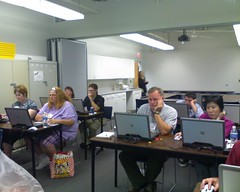
Bobbi and I finished up our 4-day workshop on all things Web 2.0 on Friday. I was surprised at how tired I got after each day of teaching, but it was also strangely invigorating, too. The students in the class were really engaged and willing to learn, although there was a lot of complaints about too-full-heads, I think they got some good information out of it and I’m really looking forward to seeing what they do when they get back to their home libraries and get some time to put this stuff into practice!
Now that everything is officially official, I can let my loyal readers know what my next big project will be (besides 4 presentations in 3 months and a changeover from Exchange to Google hosted email)! While I was in Anaheim for ALA, I was approached at my table at the Social Software Showcase by an editor for the ALA Tech Source Tech Reports and asked if I’d like to write one for them. After some discussion of topic and timing, I can now say that the May/June 2009 issue of the Tech Report will be on Collaboration 2.0 (working title – it’ll probably change…) and will deal with using Web 2.0 tools (Facebook, Ning, Twitter, Flickr, etc.) to provide a platform for collaboration in libraries. I’m pretty excited about the project and am champing at the bit to get started! I’ll be doing some serious tapping into my social network to get examples of collaboration from my librarian buddies on Twitter, Facebook, Ning (starting to sound familiar?) and the like. Don’t feel like you have to wait to be asked, though, if you are doing some collaborative project and using these tools – feel free to drop me a line and let me know what you are doing any time!